


USB C Dual Display Docking Station (45W Power Delivery)
Product ID: 72999553
Details
- BrandmediaGear
- Colorblack
- Compatible DevicesMacBook Pro
- Hardware InterfaceEthernet HDMI
- Input Voltage120 Volts (AC)
- Item Weight0.52 Pounds
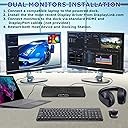
Buy MediaGear USB C Docking Station w/ 45W Laptop Power Delivery: Dual HDMI+DisplayPort, USB 3.0/2.0, Ethernet, Audio/Mic Jack, Bundle: 65W AC Adapter, C-C Cable, C-A Dongle for Mac & Windows OS: Docking Stations - desertcart.com ✓ FREE DELIVERY possible on eligible purchases Review: Really Happy - Update 1 year later - This is the first USB-C docking station I have ever bought and I have to say I'm pretty happy with it. It's nice and compact and feels well built. Nice balance of weight keeps it flat on my desk even with all the wires coming out of the back, comes with a USB-C to USB-A adapter which is a huge plus. Worked flawlessly with my USB-C laptops out of the box, with one exception that 60 watts of power is too low for my Dell XPS. That being said I have yet to find a USB-C that my XPS likes, it wants 130 watts which is not available and probably not possible. With older laptops like my HP Envy, which is now 7 years old, it worked with the USB-C to USB-A adapter and after installing DisplayLink on Windows 10 and also worked on another laptop running Windows 8 (also after installing DisplayLink). I was able to share the desktop across the two monitors attached to the docking station and and the laptops screen. I would like to see more USB 3.0 ports and on the front for flash drives. Also remember to get a dlink to HDMI adapter if your monitor doesn't support d-link. **Updated** Still like this docking station but it has been locking up lately. Of course its getting used daily now that I've been working from home so maybe this can't handle the load of working for 8 hours a day. I know its locked up when the music stops playing through MediaGear's USB Audio and the screens become unresponsive and discolored. Usually just unplugging the docking station and plugging it back in does the trick. Often it feels pretty warm when this happens so it could be overheating. I've looked at other docking stations and they just don't have as nice of a layout as this one so I hope it holds out. Review: Works with Lenovo YOGA C930 - This docking station came well packaged and the dock feels sturdy. I bought a new Lenovo Yoga C930 recently and run two monitors. I needed a docking station to get both up and running. I did a ton of research to find a dock that would work with my laptop and promised myself that when I found it, I'd make sure to put the review out so that others would have an easier time. The monitors are nothing special and mismatched...one is old enough that it only has a DVI output on it. This dock has everything most will need. I run a bluetooth keyboard, yoga mouse, logitech webcam, external hard drive, and speakers as well as the screens and this dock has ports for all with room to spare. The instructions were easy enough (REALLY small print though so have your glasses handy). Out of the box, I had everything up and running with the exception of the older monitor. I connected it originally with an HDMI cable and HDMI to DVI adaptor...no joy. I don't know if it was an active adaptor or not as I had it in a drawer. One trip to the store for a Display port to DVI cable and everything was up and running. During the process of troubleshooting the second monitor, I did update all the drivers so not sure if that was instrumental in having the new cable work but everything has been running smoothly for a week now with zero issue.



| ASIN | B07DNH2SHR |
| Customer Reviews | 4.2 4.2 out of 5 stars (197) |
| Date First Available | October 13, 2018 |
| Is Discontinued By Manufacturer | No |
| Item Weight | 8.3 ounces |
| Item model number | 8541562311 |
| Manufacturer | MEDIAGEAR INC |
| Product Dimensions | 1 x 2.75 x 8.5 inches |
J**M
Really Happy - Update 1 year later
This is the first USB-C docking station I have ever bought and I have to say I'm pretty happy with it. It's nice and compact and feels well built. Nice balance of weight keeps it flat on my desk even with all the wires coming out of the back, comes with a USB-C to USB-A adapter which is a huge plus. Worked flawlessly with my USB-C laptops out of the box, with one exception that 60 watts of power is too low for my Dell XPS. That being said I have yet to find a USB-C that my XPS likes, it wants 130 watts which is not available and probably not possible. With older laptops like my HP Envy, which is now 7 years old, it worked with the USB-C to USB-A adapter and after installing DisplayLink on Windows 10 and also worked on another laptop running Windows 8 (also after installing DisplayLink). I was able to share the desktop across the two monitors attached to the docking station and and the laptops screen. I would like to see more USB 3.0 ports and on the front for flash drives. Also remember to get a dlink to HDMI adapter if your monitor doesn't support d-link. **Updated** Still like this docking station but it has been locking up lately. Of course its getting used daily now that I've been working from home so maybe this can't handle the load of working for 8 hours a day. I know its locked up when the music stops playing through MediaGear's USB Audio and the screens become unresponsive and discolored. Usually just unplugging the docking station and plugging it back in does the trick. Often it feels pretty warm when this happens so it could be overheating. I've looked at other docking stations and they just don't have as nice of a layout as this one so I hope it holds out.
E**S
Works with Lenovo YOGA C930
This docking station came well packaged and the dock feels sturdy. I bought a new Lenovo Yoga C930 recently and run two monitors. I needed a docking station to get both up and running. I did a ton of research to find a dock that would work with my laptop and promised myself that when I found it, I'd make sure to put the review out so that others would have an easier time. The monitors are nothing special and mismatched...one is old enough that it only has a DVI output on it. This dock has everything most will need. I run a bluetooth keyboard, yoga mouse, logitech webcam, external hard drive, and speakers as well as the screens and this dock has ports for all with room to spare. The instructions were easy enough (REALLY small print though so have your glasses handy). Out of the box, I had everything up and running with the exception of the older monitor. I connected it originally with an HDMI cable and HDMI to DVI adaptor...no joy. I don't know if it was an active adaptor or not as I had it in a drawer. One trip to the store for a Display port to DVI cable and everything was up and running. During the process of troubleshooting the second monitor, I did update all the drivers so not sure if that was instrumental in having the new cable work but everything has been running smoothly for a week now with zero issue.
E**.
Works well but expensive
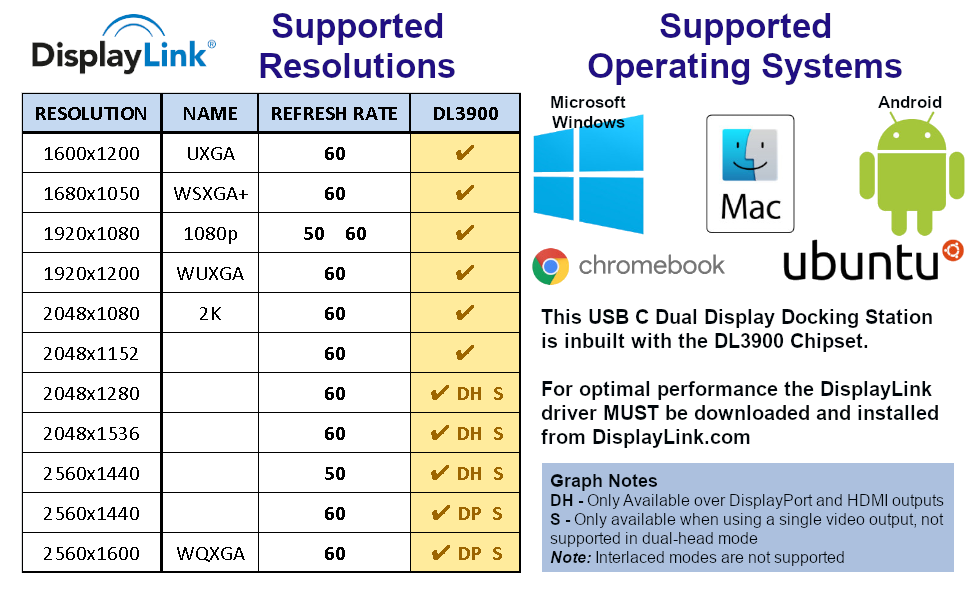
In general it works well. There are less expensive models that work the same. Three advantages of this type of model. 1) comes with its own power cord, so you can keep the laptops charger in your travel bag. 2) It has an audio port (most docking stations don't). 3) It supports 2 external monitors. Note that we have had some problems were the computer crashes if you use non-standard monitor resolutions. So don't do that.
E**Y
Best Tech Support Ever
After doing a lot of research on docking stations, I decided to purchase the MediaGear USB-C Universal Dock for my HP Spectre X360 Convertible 15" laptop. It offered everything that I was looking for and more for what I considered a very good price. I received the dock on March 13, 2019 and found the installation instructions easy and concise. After about 3 months, I noticed that the dock was not charging my laptop as it had claimed. I contacted MediaGear immediately to find out what the problem was and can honestly say that I have never had a better experience dealing with customer support in any line of business. Without going into too much detail, they were quick to respond, professional, friendly and genuinely cared about my issue. They first sent me a new cable, then a whole new docking station in attempts to solve the problem. The final resolution came from HP, who MeadiaGear tech support suggested I contact. This was a known issue with my laptop which I tried unsuccessfully to find on-line at one point during the process. HP said it was not a problem with the MediaGear dock and in about 5 minutes walked me through the steps to solve it. The dock is now working properly. I highly recommend this particular product and can say without a doubt that the MediaGear tech support - special thanks to Sai - should be a model to all other tech companies. Don P - Heath, Texas
B**.
Great features at this price level, phenomenal customer support
For the features I was looking for, most similar products were in a very different price range, many 3 times as expensive. This gave the most features for the most reasonable price (3.5mm jack, RJ-45, HDMI, PD, etc.). Everything worked great for about a year when suddenly the docking station no longer transmitted through USB C and power was no longer coming through (although the USB A option was still functional which is interesting since it uses the same port on the docking station and the cord itself was not the issue.). I worked with several members of their customer support and tech support teams to troubleshoot and ultimately fix the problem. Their level of service and focus on customer satisfaction was outstanding! In the end, I received a replacement unit under warranty with absolutely no hassle from their end. The replacement unit is working great! I highly recommend this product and this company. Well done!
H**G
Cheap Product
I constantly need to reboot my MacBook pro to get this to work. Sometimes I need to reboot multiple times. If I don't the screen remains black and unusable both on my monitors and on the laptop. It would be better to buy something more expensive that will work.
Trustpilot
3 weeks ago
2 days ago